
Your WhatsApp workspace
Connect WhatsApp to the systems you already run
Send messages, manage contacts and receive signed events with scoped API access.
StarterGrowthProAccount & setup requirements apply
A useful next step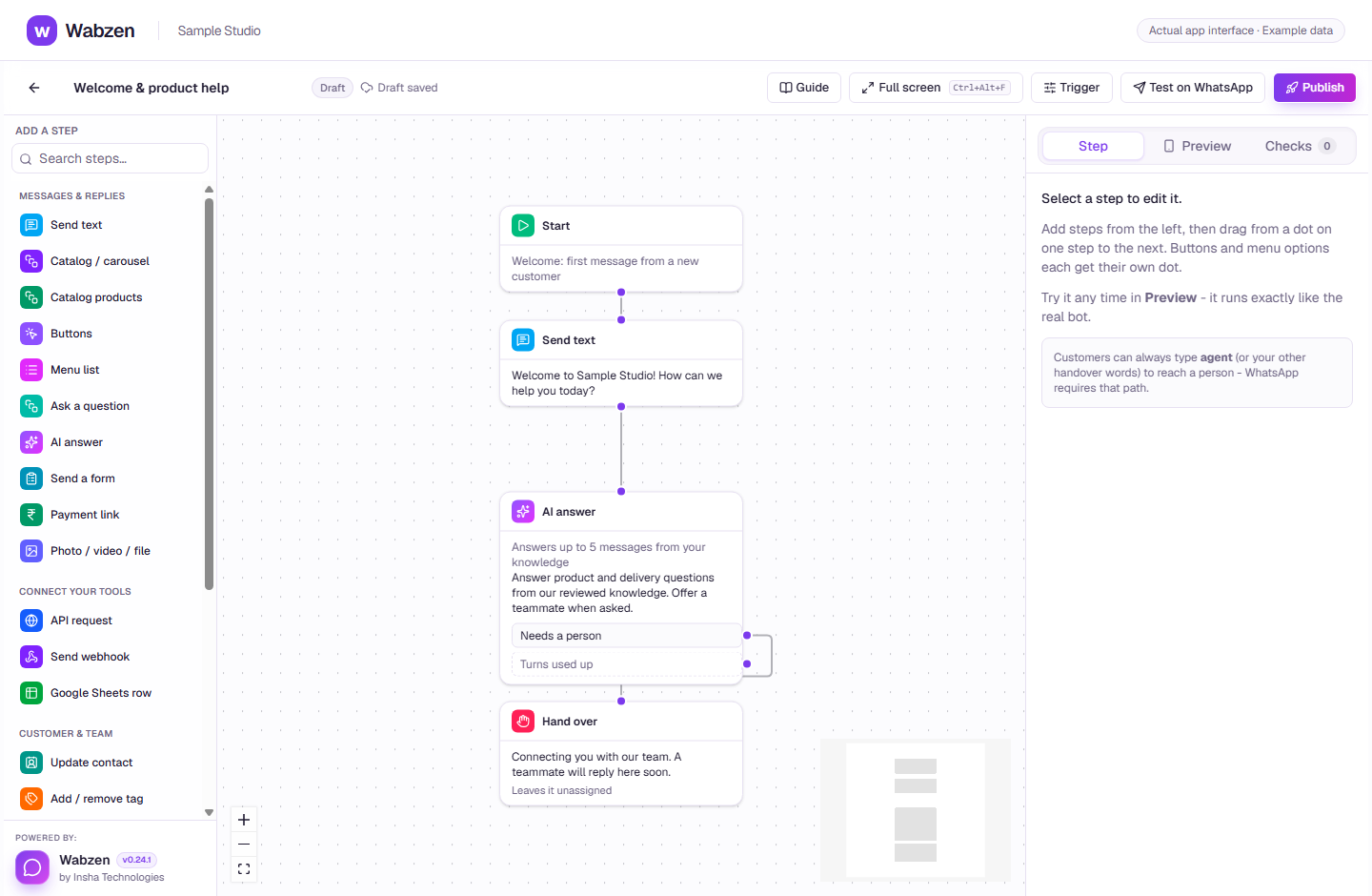
The visual builder where message, AI, form and integration steps connect. Actual app interface with example data. Explore the walkthrough
What your team can do
Create API keys with only the scopes you need.
Use the OpenAPI reference and request examples.
Receive events at your webhook endpoint.
How it works
A clear path from setup to action.
01
Choose an eligible plan
API and webhook access are listed separately in pricing.
02
Create a scoped key
Create the key in Developer and store it securely.
03
Build & verify
Follow the API reference and validate webhook signatures in your receiving system.
Your questions
Good to know before you start.
Where is the reference?+
The public API documentation is available from API docs in the website navigation.
Do API sends follow the same rules?+
Yes. Subscription, consent, number, template and reply-window rules apply to API sends too.
Bring your next conversation here.
Start with your own WhatsApp Business account and a plan that fits your team.